
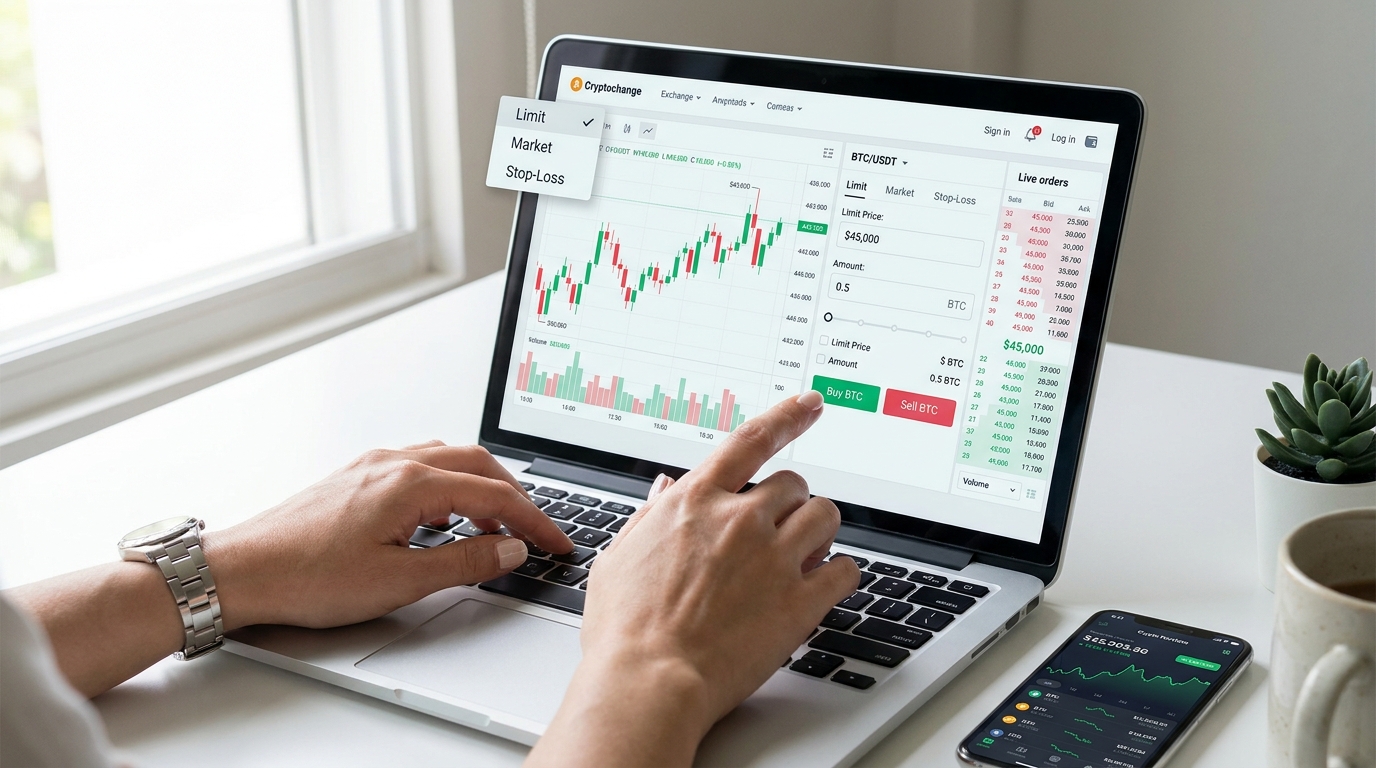
Crypto exchanges offer traders three essential order types: limit orders for price control, market orders for execution speed, and stop-loss orders for automatic risk protection. Understanding when and how to use each one is the foundation of effective spot trading. This guide explains the mechanics of all three, walks you through placing them on a real exchange, and provides a practical decision framework so you can choose the right tool for every trade. Whether you’re protecting a position, entering at a precise price, or exiting quickly during volatile conditions, mastering these order types will give you more control over your outcomes and help you trade with fewer regrets.
What Crypto Order Types Do and When They Matter
Order types are the mechanics that determine how, when, and at what price your buy or sell order gets executed on an exchange. They sit at the intersection of three competing priorities: achieving the price you want, filling your order quickly, and managing risk. No single order type wins on all three fronts, so traders choose based on market conditions, urgency, and their trading goal.
Understanding the role of order types in execution and risk management is crucial because the exchange does not automatically find the best outcome for you—it follows the instructions you give it. A poorly chosen order type can cost you money through slippage (paying more than expected when buying, or receiving less when selling), missed fills, or leaving a position unprotected during a sudden price drop. The key insight is recognizing the trade-off: limit orders give you price control but slower execution, market orders fill instantly but at uncertain prices, and stop-loss orders protect you automatically but only after a trigger price is hit.
Why Traders Choose Different Order Types
No single order type is best in every market condition. The choice depends on three primary factors: liquidity (how much trading volume exists at nearby prices), volatility (how fast and unpredictably the price moves), and urgency (how soon you need the trade to execute).
In a liquid, calm market with a deep order book, limit orders work well because there are many buyers and sellers ready to trade near your price. In a volatile or thinly traded market, market orders become attractive because waiting for a limit fill might mean missing the move entirely, or the price might gap past your limit before it fills. Stop-loss orders make sense whenever you’re holding a position you want to protect—they work in any condition because they simply trigger at a pre-set price level and then execute (using either market or limit terms).
Beginners often default to market orders because they “just work,” but experienced traders mix all three based on the situation. Understanding when to swap them out is what separates disciplined traders from those who give back profits to slippage.
The Three Orders Covered in This Guide
Limit orders let you set a maximum price you’re willing to pay (buy limit) or a minimum price you’re willing to accept (sell limit). They fill only if the market reaches your price, which gives you control but no guarantee of execution.
Market orders execute immediately at the best available price in the current order book, ensuring you get in or out fast but often at a worse price than you expected due to slippage.
Stop-loss orders monitor the price continuously; when it drops to your trigger price (or below for a buy stop), the exchange automatically sends a new order into the market. Depending on the exchange and your settings, that order can be a market order (guaranteed to fill but uncertain price) or a limit order (price protected but not guaranteed to fill).
Each of these will be explored in depth below, along with practical examples and a decision framework to help you choose wisely.
Limit Orders: Control the Price You Pay or Receive
A limit order is a promise: “I will buy (or sell) only if the price reaches my target level or better.” This gives you complete price control—you will never pay more (on a buy) or receive less (on a sell) than your limit price. The trade-off is certainty: your order might never fill if the market doesn’t reach your price, or it might sit open for days.
Limit orders are ideal when you have a clear target entry or exit price and time to wait, or when you’re trading a pair with solid liquidity and you want to avoid slippage. They’re also excellent for scaling into or out of a position over time, because each limit can be sized and priced independently.
| Field | Buy Limit Order | Sell Limit Order |
|---|---|---|
| How it works | Waits for price to drop to or below your limit | Waits for price to rise to or above your limit |
| Fill condition | Only executes if market price ≤ your limit | Only executes if market price ≥ your limit |
| Your protection | Ensures you never overpay | Ensures you never undersell |
| Risk | May never fill if price jumps away; you stay in cash | May never fill if price never rises; you hold the asset longer |
| Best use case | Entering a long position at a discount; scaling in gradually | Exiting a position at profit; taking gains in a rally |
| Typical volatility | Low to medium; limits work best in calmer conditions | Low to medium; limits work best in calmer conditions |
How to Place a Limit Order Step by Step
Follow this process on any major exchange (Binance, Bybit, Kraken, Coinbase Pro, or MEXC):
- Select your trading pair. Choose the asset you want to trade (e.g., BTC/USDT for Bitcoin in US Dollars). Ensure the pair has adequate liquidity—check the order book depth on the exchange to see how many bids and asks are stacked at nearby prices.
- Navigate to the spot trading interface and select “Limit Order” from the order type menu.
- Set your limit price. Enter the exact price at which you want to buy or sell. For a buy, this is your maximum; for a sell, this is your minimum. Check the current market price first so your limit makes sense—unrealistic limits (far from the current price) may take weeks to fill or never fill at all.
- Enter your amount. Specify how much of the asset you want to buy or sell (e.g., 0.5 BTC). Some exchanges let you enter total cost instead (e.g., $20,000 worth); use whichever is clearer to you.
- Review fees and total cost. Most exchanges show a fee estimate before you confirm. On spot trading, you typically pay a maker fee (0.02%–0.10% depending on the exchange and your account tier) if you’re adding liquidity by posting a limit order that fills later.
- Confirm and submit. Once you hit confirm, your order enters the order book as an open order. It will remain there until it fills, you cancel it, or (on some exchanges) it expires after a set period.
After placement, monitor your open orders section. If the market price approaches your limit, you may see a partial fill (only part of your order executes) if the order book doesn’t have enough volume at that exact level. You can cancel an unfilled limit order at any time.
Market Orders: Trade Immediately at the Best Available Price
A market order says: “I need this trade to happen now, at whatever price the market currently offers.” It executes instantly against the best bids or asks in the current order book, guaranteeing you get in or out—but not at a predictable price.
Market orders are the speed-focused choice. They’re essential when you need to act fast, but they come with a hidden cost called slippage: the difference between the price you expected and the price you actually paid. In a liquid market with a deep order book, slippage is tiny (a few basis points). In a thin market or during a sudden move, slippage can be severe.
| Field | Market Order | Limit Order |
|---|---|---|
| Execution speed | Instant, guaranteed fill | Depends on market reaching your price |
| Price certainty | Low—you see an estimate, but the actual fill may differ | High—you set the price in advance |
| Slippage risk | High in volatile or thin markets | None—you control the maximum price |
| Fill guarantee | 100% (as long as there is order book liquidity) | No guarantee; may never fill |
| Typical use | Fast entry/exit, FOMO avoidance, reaction to news | Patient accumulation, profit targets, dollar-cost averaging |
| Feature | Market Order | Practical Implication |
|---|---|---|
| No order book wait | Fills against existing bids/asks immediately | Best when speed outweighs cost |
| Taker fee applies | You pay 0.05%–0.10% (usually higher than maker fee) | More expensive than a limit that sits and fills |
| Slippage on large orders | Big orders may walk up or down the order book, hitting progressively worse prices | Smaller orders (up to 5–10% of daily volume) typically experience minimal slippage |
| Volatile pairs hit harder | Altcoins and low-volume pairs experience higher slippage | Stick to market orders on major pairs (BTC, ETH, USDT pairs) |
When Market Orders Make Sense
Market orders shine in a few specific situations:
- You’re exiting a losing position quickly. If a trade is going against you and you want out immediately, a market order guarantees you close the position. A limit order might leave you still holding the asset as the price keeps falling.
- High liquidity pairs during normal market hours. Major pairs like BTC/USDT, ETH/USDT, and stablecoin pairs have deep order books, so slippage is minimal and market orders are safe.
- You’re reacting to urgent news or price levels. In fast-moving markets, waiting for a limit fill can mean missing the opportunity. Market orders are immediate.
- You’re scaling into an entry over time. Using small market orders to build a position across multiple price levels can be faster and simpler than managing many tiny limits.
How to Place a Market Order
The process is nearly identical to a limit order, but simpler:
- Select your pair and navigate to spot trading.
- Choose “Market Order” from the order type dropdown.
- Specify the amount you want to buy or sell (in base currency or quote currency depending on the exchange).
- Review the estimated total cost or proceeds. The exchange will show you an estimate—something like “Est. cost: 1.00234 BTC” for a buy or “Est. proceeds: $20,050” for a sell. This is not guaranteed; the actual fill may vary slightly.
- Confirm and execute. Unlike a limit order, there’s no waiting—the order executes immediately against the order book.
The market order prioritizes execution speed over exact price. You’re essentially saying, “Fill me at market, even if it’s not perfect.”
Stop-Loss Orders: Limit Downside Risk Automatically
A stop-loss order is a safety mechanism. You set a trigger price (e.g., “sell my Bitcoin if it drops to $42,000”), and when the market reaches that price, the exchange automatically sends a new order into the market on your behalf. Unlike limit and market orders, which sit in the order book waiting, stop-loss orders live outside the book until they’re triggered.
Stop-loss orders are fundamentally about risk management, not profit-taking. They let you hold a position and sleep at night knowing that a sudden crash won’t wipe you out. The catch is understanding what happens after the trigger: depending on the exchange and your settings, your stop can become either a market order (which fills fast but at an unpredictable price during a crash) or a limit order (which protects your price but might not fill in a fast-moving market).
| Item | Stop Price | Order After Trigger | Main Risk |
|---|---|---|---|
| Definition | The price level that activates your stop | The type of order (market or limit) sent after trigger | Execution failure or worse-than-expected fill |
| When it activates | As soon as the last market price touches or crosses your stop | Immediately after trigger; the new order enters the book | If market is crashing, your stop-market may fill far below your expectation |
| Your control | You set the trigger; the exchange monitors it | Depends on whether you chose stop-market or stop-limit | Stop-limit may fail to fill if price gaps past your limit after trigger |
| Typical scenario | You hold 1 BTC at $45,000 entry; set stop to $42,000 | When BTC hits $42,000, your sell order is created | If there’s panic selling, you might fill at $40,500 on a stop-market |
Stop-Loss vs Stop-Limit on Crypto Exchanges
The critical distinction is what order type the exchange uses after the trigger. Most exchanges let you choose, and each has a different profile:
| Feature | Stop-Loss Market | Stop-Limit |
|---|---|---|
| Order type after trigger | Market order (guaranteed speed, uncertain price) | Limit order (price protected, no execution guarantee) |
| Fill certainty | ~100% in normal conditions; lower during extreme volatility | Depends on how fast the market moves past your limit |
| Price protection | None—you get whatever the market offers when triggered | Your limit price is a floor (for sell stops) or ceiling (for buy stops) |
| Best use | Protecting capital during a crash; position-exiting | Protecting against too much loss; willing to hold longer for a better exit |
| Practical example | BTC at $45K, stop-market at $42K; if crash hits $40K, you might exit at $39,500 | BTC at $45K, stop-limit at $42K / limit $41,500; if crash skips to $39K, your order doesn’t fill and you still hold |
| Fee | Taker fee (0.05%–0.10%) because it’s a market order | Maker fee (0.02%–0.05%) if it fills as a limit; may also apply taker if partially filled |
Stop-loss market is ideal for aggressive risk management. You prioritize exiting the position over price; if your stop triggers, you’re out, period. This is appropriate for traders who hold core positions and never want to wake up to a 20% loss.
Stop-limit is for traders who are willing to accept some loss (because the stop triggers) but want to draw a line: “I’ll accept a loss up to this price, but not beyond.” The downside is that in a fast crash, the market can gap past both your trigger and your limit, leaving you still holding the asset as it falls further.
Choosing the Right Order Type for Your Situation
The best order type depends on your trading goal, market conditions, and how urgently you need the trade to happen. Below is a practical framework to guide your choice, followed by a decision matrix and a list of common mistakes.
Decision Matrix by Trading Goal
| Trading Goal | Best Order Type | Why |
|---|---|---|
| Enter a position at a specific (lower) price | Limit buy | Gives you price control; lets you wait for the dip without overpaying |
| Exit a winning position and lock in profit | Limit sell (if time permits) or market (if price is rising fast) | Limit lets you capture full value; market ensures you don’t miss the rally |
| Close a losing position right now | Market sell | Speed is priority; you want out immediately regardless of price |
| Protect a position from a sudden crash | Stop-loss market or stop-limit (depending on risk tolerance) | Stops trigger automatically; market stops guarantee exit, limits protect price |
| Scale into a position over days/weeks | Multiple small limit orders at different prices | Each limit can be sized and priced independently; lets you accumulate gradually |
| React to a breakout or technical level | Market order (if liquidity is good) | Ensures you don’t miss the move; speeds past the decision lag |
Common Mistakes to Avoid
- Overusing market orders for everything. Market orders are convenient but expensive (taker fees + slippage). Limit orders cost less if you’re patient; use market only when speed is essential.
- Setting limit prices too far from the market. A limit order priced unrealistically (e.g., trying to buy BTC at $20,000 when it’s at $45,000) may never fill. Use limit orders within 1–5% of the current price unless you have a very long time horizon.
- Setting stop-loss too tight. If you set a stop at 2% below your entry on a volatile pair, normal price noise will trigger it, locking in losses. Use 3–5% for volatile assets, tighter only for stablecoins or major pairs.
- Forgetting to check the order book before placing. A limit order in a thin market won’t fill if there’s not enough volume at that price. Always check order book depth first.
- Ignoring fees on small trades. A 0.10% market fee + 0.10% slippage adds up fast on a small order. On $100 trades, that’s $0.20 in costs; use a limit order instead.
- Placing a stop-limit with a limit price too far from the stop price. If your stop triggers at $42,000 but your limit is $40,000, and the market crashes to $41,000 in a gap, your order never fills. Keep stop and limit prices close (e.g., stop at $42,000, limit at $41,500).
- Not reviewing your order after placement. Always confirm that your order is open and correct. Check the order history or open orders section immediately after submitting.
Fees, Slippage, and Liquidity
Understanding the hidden costs of trading is just as important as learning to place orders. Three factors affect the real cost of your trades: maker and taker fees, slippage, and order book liquidity.
Most exchanges charge a maker fee (0.02%–0.05% typically) when you place an order that sits in the book and fills later, and a higher taker fee (0.05%–0.10%) when your order fills immediately against existing orders. Limit orders are usually makers (you add liquidity by posting), while market orders are always takers (you consume liquidity). The small fee difference compounds over time: on a $10,000 trade, maker fees might cost $2–$5, while taker fees cost $5–$10.
Slippage is the gap between the price you expected and the price you actually got. When you place a market order, the exchange estimates a fill price based on the current order book, but by the time your order reaches the book, the market may have moved. If you’re buying 1 BTC and the order book only has 0.3 BTC at your estimated price, your remaining 0.7 BTC will fill at the next level up (higher price), creating slippage. Large orders and volatile pairs experience more slippage.
Liquidity is the depth and density of the order book. High liquidity means many buyers and sellers are ready to trade near the current price, so both limit and market orders execute cleanly. Low liquidity (thin order book, large gaps between bids and asks) means limit orders may sit longer and market orders experience worse slippage.
How Execution Quality Changes Across Market Conditions
| Market Condition | Risk | Likely Impact on Order Type |
|---|---|---|
| Calm, liquid market (e.g., BTC/USDT during normal hours) | Minimal; deep order book, tight spreads | Limit and market orders both execute well; limit is cheaper, market is faster |
| Normal volatility, moderate liquidity (e.g., mid-cap altcoin) | Moderate slippage on market orders; limits may take longer to fill | Use market for exits, limit for entries; keep stop-losses at 3%+ |
| High volatility, thinning liquidity (e.g., low-cap altcoin or during news spike) | High slippage on market orders; limit orders may never fill; stop-limits may gap without filling | Stick to market orders if you must trade; avoid limits; stop-markets are safer than stop-limits |
| Low liquidity, wide spreads (e.g., new or obscure pairs) | Severe slippage; order book can be walked easily; wide bid-ask spread eats into profit | Avoid market orders; use tight limits or avoid trading the pair altogether |
| Flash crash or extreme volatility (e.g., sudden 10%+ drop in seconds) | Stop-limits may fail to fill; market stops fill far below expectation; partial fills common | Prioritize execution over price; stop-market is most reliable, but expect worse fill |
The key insight is that price certainty and fill certainty rarely peak at the same time. Limit orders give you price certainty but lower fill certainty; market orders do the opposite. Stop-limit orders try to balance both but fail if the market moves too fast.
Practical Workflow on a Crypto Exchange
Here’s how a complete trading workflow looks from start to finish, with risk checks at each stage.
- Identify your trading pair and confirm it’s liquid. Check the order book on your exchange; look for consistent bids and asks within 1–2% of the midpoint.
- Decide on your order type based on urgency, market conditions, and your price target. Use the decision matrix above.
- Check your available balance. Make sure you have enough funds (for a buy) or enough of the asset (for a sell). Remember that fees will be deducted from your balance or proceeds.
- Review the current market price and set your order price. For a limit, ensure it’s realistic. For a stop-loss, set the trigger below support (for a sell stop) or above resistance (for a buy stop).
- Enter your order amount and double-check the total cost or proceeds before submitting.
- Confirm the order type is correct (limit, market, or stop), and hit submit.
Before You Place the Order
- Verify the trading pair is correct. Accidentally trading BTC/USDT instead of BTC/EUR, or BTC/BUSD instead of BTC/USDT, can lead to unexpected slippage or fees.
- Check the order book depth. Look for at least 2–3 layers of liquidity at and near your intended price to avoid surprises.
- Confirm your available balance. Some exchanges hold balance differently for open orders vs. free balance; ensure you have enough.
- Review the fee for your account tier. If you’re a new user with no trading volume, you’ll pay the default (higher) taker fee; experienced traders with high volume get discounts.
- Set realistic limits and stops. A limit priced unrealistically or a stop too tight will create frustration and possibly lock in losses.
After You Place the Order
Once your order is live, navigate to your open orders or order history section on the exchange to monitor it. For a limit order, check back occasionally to see if it’s been filled; you can cancel it at any time if the market moved away. For a market order, you should see the fill confirm almost immediately in your trade history. For a stop-loss order, it will appear in a “Stop Orders” or “Conditional Orders” section (varies by exchange) until it’s triggered, at which point it becomes a regular open order, then a filled trade.
After execution, review your filled trades and verify that the fill price matches your expectation (or is close for a market order). Check that fees were calculated correctly and that your balance updated. If you notice an error, contact support—most exchanges have transaction history you can reference.
Key Takeaways for Safer Trading
The three order types are not interchangeable; they solve different problems. Limit orders give you price control but require patience. Market orders guarantee execution but cost more in fees and slippage. Stop-loss orders protect you automatically but vary in reliability depending on whether they trigger as market or limit orders.
The best order type is the one that matches your goal and market conditions—not the one that’s easiest to click or most familiar. Disciplined traders choose based on urgency, liquidity, and volatility. Casual traders tend to default to market orders and pay more in fees and slippage over time.
How to Think About Order Selection Going Forward
Rather than developing a habit of always using one order type, train yourself to ask three questions before placing any order:
- How urgent is this trade? If you have time, use a limit and save on fees. If you need immediate execution, use a market.
- How deep is the order book? If liquidity is low, avoid market orders and large trades; use limit orders or skip the pair.
- What am I protecting? If you’re holding a position, use a stop-loss—market stops for aggressive protection, stop-limits for price protection.
As you gain experience, you’ll develop an intuition for when to swap order types. That flexibility is what separates profitable traders from those who stick rigidly to one approach and wonder why their costs are high. Start here, practice with small trades, and adjust as you learn how each order type behaves on your preferred exchange.